Installing security systems requires precision, planning, and a deep understanding of how each component works together. Whether you’re a professional installer or a property owner setting up your own equipment, wiring errors can lead to system failure, false alarms, or blind spots that compromise protection. Fortunately, most problems can be avoided with proper knowledge and attention to detail. Here are the most common mistakes that occur when connecting security systems and steps you can take to prevent them.
One of the biggest mistakes in installing security systems is poor cable management. Messy wiring can lead to signal interference, difficulty in troubleshooting, and even fire hazards if cables are bent or pinched. Installers often rush through jobs, leaving wires tangled or disorganized behind walls or ceilings. To avoid this, always plan your cable routes before installation, use proper cable trays or channels, and clearly label each wire. Clean routing not only protects cables from damage, but also makes maintenance faster and easier, ensuring the long-term functionality of your security systems.
Another common problem is using the wrong type of cable for the task. Many security systems rely on specific cable classes for cameras, sensors, or control panels. For example, using a low-quality or unshielded cable where a shielded cable is required may cause interference, image distortion, or connection problems. Installers sometimes try to cut costs by using cheaper materials, but this often leads to replacing the wiring later. Always check the manufacturer’s recommendations and environmental conditions – such as temperature, humidity, or electromagnetic interference – to ensure that the cable meets the requirements of your security systems.
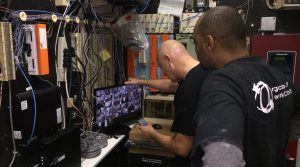
Technologies that audit security systems
Improper layout of the power supply is also a frequent mistake. Security systems rely on consistent and stable power supplies, and failure to evaluate load requirements could cause cameras or sensors to stop working. Using a single power supply for too many devices results in voltage drop, especially along long cables. To prevent this from happening, calculate total wattage needs, use power distribution boxes when necessary, and consider using POE (Power Over Ethernet) for compatible cameras. Designing reliable power infrastructure is essential to keeping security systems running without interruption.
Neglecting grounding and surge protection is another mistake that can lead to serious damage to safety systems. Lightning strikes, electrical surges, and static buildups can burn circuit boards or destroy cameras instantly. Failure to properly use surge protectors or ground equipment exposes the entire system to unnecessary risk. To avoid this, install a surge protection system on all incoming lines, follow electrical rules for grounding, and make sure outdoor cameras or exposed wires are fully protected. This simple step dramatically increases the life and reliability of security systems.
Incorrect placement of cameras and sensors is another common mistake. Even with perfect connections, security systems will not function properly if devices are installed in a location where they cannot detect activity. Blind spots often occur when installers fail to consider angles, lighting conditions, or environmental obstructions such as trees or door frames. The best way to prevent placement errors is to conduct a complete site survey before installation. Check lighting at different times of the day, measure distances, and test sensor ranges before determining locations. Proper placement ensures that security systems take accurate shots and detect motion effectively.
Failure to secure wires is also a major problem. Exposed or unprotected wires make security systems vulnerable to tampering by hackers. Thieves often look for external camera cables or alarm wires that they can cut to disable the system. To avoid this, run cables through walls, ducts, or protected paths. External wiring should always be protected with weatherproof materials, while internal wiring should be hidden or secured behind panels. Cable protection increases the durability and resilience of your security systems against intentional damage.
Another common mistake is not testing equipment throughout the installation process. Many installers connect all devices before testing, only to find that they must trace multiple connection points to fix problems. Using safety systems, on-the-go testing saves time and prevents faulty wiring from going unnoticed. After connecting each camera, sensor, or board, check its power, signal strength, and function before moving forward. This reduces the risk of having to rewire large sections of wiring and keeps the installation workflow for security systems efficient.
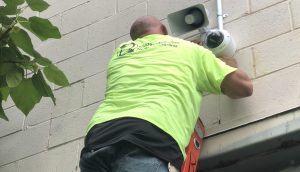
Installing security surveillance cameras
Skipping firmware updates or configuration modifications is also a common mistake. Even with perfect wiring, security systems need proper software configuration to function properly. Many installers forget to update cameras, reset factory passwords, or adjust motion sensitivity settings. This can lead to false alarms, poor security, or devices failing to communicate with the main system. Always complete the installation by updating all devices, setting strong passwords, and configuring network settings. These final steps ensure that your security systems operate smoothly and safely.
Finally, poor documentation can create long-term problems. When connecting security systems, failure to document cable routes, device locations, and connection points makes future repairs or upgrades extremely difficult. Without the proper diagrams or labels, technicians may waste hours trying to determine which cable serves which device. To avoid this, create a delivery map for the entire system, label each endpoint, and store documentation where it can be easily accessed. Clear documentation ensures that security systems can be maintained over the long term.
For assistance with any project or installation in the New Jersey or Philadelphia area, please call us at 877-832-1206.
For more ideas please visit – https://www.bridgecable.com/services/
For more information and educational content please visit:
https://www.youtube.com/@BridgeCable
Copyright © 2025 Bridge Cable. All rights reserved.
Mail: 2745 Terwood Road, Willow Grove, PA 19090
Warehouse: 2066 W. Hunting Park Ave, STE 308, Philadelphia, PA 19140